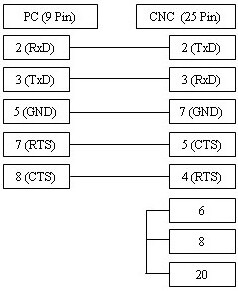
Die Konfiguration der Fanuc 6M und 6T Steuerungen erfordert eine präzise Einstellung der Parameter 340, 341 sowie des Parameters 311 für die Baudraten-Synchronisation. Als etablierte CNC-Steuerung setzt die Fanuc 6-Serie auf eine robuste serielle Schnittstelle. Durch die korrekte Parametrierung und die Verwendung des passenden RS232-Kabels stellen Sie eine zuverlässige Datenübertragung für Ihr DNC-System sicher. Achten Sie bei der Einrichtung besonders auf die Wahl zwischen ISO-Code und der korrekten Flusssteuerung, um einen reibungslosen Datenaustausch zu gewährleisten.
| Parameter | Value | Comments |
|---|---|---|
| 340 | 2 | |
| 341 | 2 | |
| 311 | 0001 1000 (Baud 2400) | |
| 0001 0110 = 600 | ||
| 0001 0111 = 1200 | ||
| 0001 1000 = 2400 ** | ||
| 0001 1001 = 4800 | ||
| 0001 1010 = 9600 | ||
| TV On/Off | 0 = Disabled | |
| Punch Code | 1 = ISO | |
| Input Unit | 0 | |
| Input device | 1 = 1 | |
| Input Device | 2 = 1 | |
| In EasyDNC set Baud Rate, Parity, DataBits and StopBits as above. Set 'Mode=Auto or Fanuc' | ||
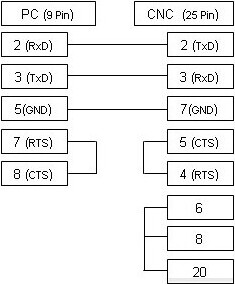
Das oben abgebildete Kabel ist die am häufigsten verwendete Variante und unterstützt die xOn/xOff-Steuerung (DC1/DC3). Falls Ihre CNC-Maschine für die RTS/CTS-Flusssteuerung (Hardware) konfiguriert ist, beachten Sie bitte das untenstehende alternative Anschlussdiagramm, das in den meisten Fällen beide Arten der Steuerung unterstützt.